A mobile-first, video-first publishing tool

One video, every platform, one tap.

And you always know what went out, what did not, and why. PostInAll takes your own original video from its clean source file and uploads it natively to the platforms you choose, through their official APIs.

How it works Frequently asked questions

Three concrete problems we solve

Silent failure

You should not be the last to know a post failed

The most common complaint about tools in this category is a post that quietly fails with no explanation. PostInAll tracks state for every destination separately and tells you exactly why something failed and what to do about it.

Watermark penalty

A clean master, watermark-free everywhere

Videos downloaded from one platform and re-uploaded to another get their reach reduced because of the watermark. PostInAll uploads from your source file; it has no feature for downloading from other platforms or removing watermarks, and never will.

Working on a phone

If you shoot on your phone, publish from your phone

This category was designed for the desktop; mobile apps were bolted on later as second-class clients. PostInAll was designed for mobile from the start: interruption-tolerant background uploads and a one-handed composer.

How it works

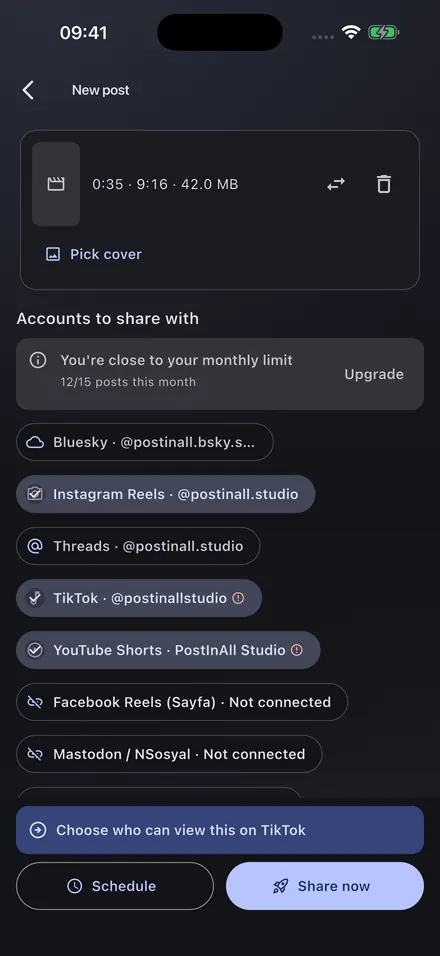
Four steps. You trigger all of them; nothing publishes on its own in the background.

  1. Step 1

    Pick your video

    You choose the video through the system gallery picker. The app requests no media permission and cannot see anything in your gallery beyond the file you selected. Duration, resolution, codec and file size are read immediately.

  2. Step 2

    Write once, override per platform if you want

    You write the shared title and description once. Open any platform's card to enter text and settings specific to it; if you do not, the shared text is used. A smart counter shows the tightest limit among the selected platforms.

  3. Step 3

    Pre-flight check

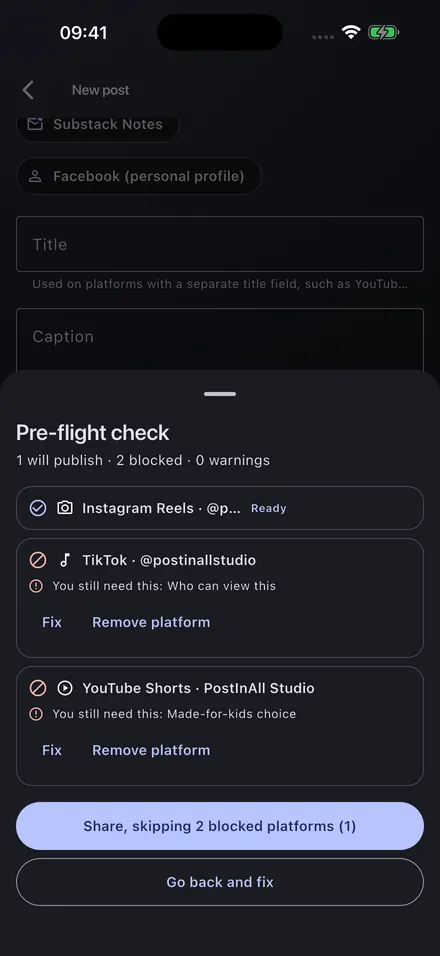
    Before you press Publish, a rule check runs for every platform. Blockers and warnings are listed separately; you decide what to fix and what to skip.

  4. Step 4

    A line-by-line receipt

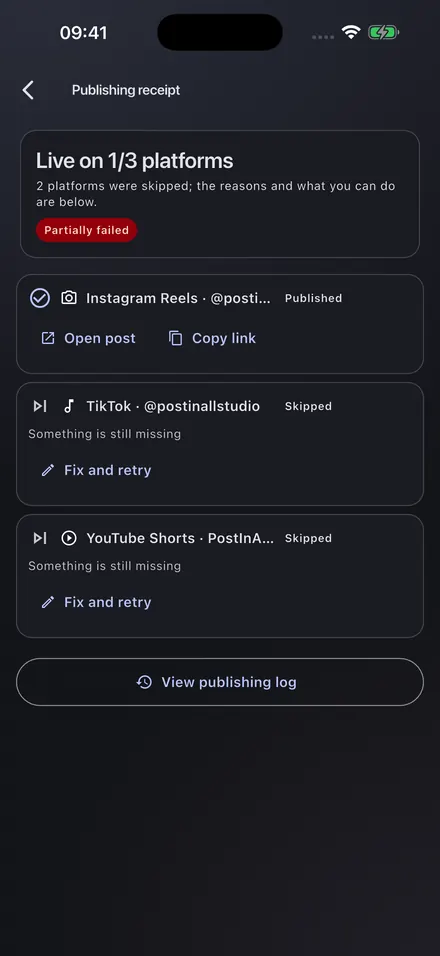
    When publishing finishes you do not get a single "success/failure" summary — you get a per-platform result: what is live with its link, what failed and why, and a one-tap retry.

Pre-flight: blocker or warning?

Every platform has different text, duration, format and quota rules. PostInAll reads them from a versioned rule set delivered by our server — so when a platform changes a limit, you do not need an app update.

Blocker

As it stands, publishing will definitely fail

  • A hard character, duration or file-size limit is exceeded
  • A required platform field is empty (for example the made-for-kids declaration or the visibility choice)
  • The account connection has expired
  • The platform's daily publishing quota is used up

You either fix that line or drop that platform from this post.

Warning

It will publish, but you should know

  • Text that falls outside the visible part of the description
  • More hashtags than recommended
  • A landscape video going to a vertical-first platform
  • Another platform's watermark visible in the video

Warnings never stop publishing; the decision is yours.

The check runs both on the device and on the server, and both use the same rule set. The server-side result is authoritative, so you never hit the "the counter said it was fine, the platform rejected it" trust break.

The partial-failure receipt

A mixed result is shown as a mixed result. The example below shows how a real publishing result looks in the app.

3 of 4 destinations are live

  • Live Instagram Reels — open post, copy link
  • Live YouTube Shorts — open post
  • Live TikTok — open post
  • Failed Threads — timed out while the video was processing. Your video and text are safe. Retry.
Example publishing receipt: three platforms live, one failed because of a timeout.

Two ways to recover

Retry: the same content, only the failed destinations. Every destination carries a stable idempotency key, so the same video is never sent to the same account twice.

Fix and retry: the composer opens with only the failed platform's context; destinations that are already live are locked.

Error messages come from a translated catalogue — raw platform errors are never shown. Every error maps to an action: reconnect the account, edit the text, or wait for the quota.

Supported platforms

Everything runs through the platform's official developer API. No unofficial interfaces, no automation tricks, no account impersonation.

Core

  • Instagram Reels
  • TikTok
  • YouTube Shorts

Other platforms

  • Facebook Reels (Page)
  • Threads
  • Bluesky
  • Mastodon / NSosyal
  • Telegram (Channel)
  • Discord (Webhook)

Planned

  • Pinterest
  • X (optional add-on)
About brand relationships

PostInAll is an independent product. The names above are used as plain text, solely to identify which service a post is delivered to. We have no official partnership, affiliation, sponsorship or endorsement relationship with these platforms, and no platform logos are used on this site. All trademarks belong to their respective owners.

Honest constraints

We state these just as plainly inside the app as we do before you download it. Platform rules are not our choice — but not surprising you with them is our job.

Constraints imposed by the platforms that you need to know about
Topic Constraint How the app handles it
Instagram account type Personal accounts cannot publish through the API; your account must be a Business or Creator (professional) account. A Facebook Page is not required. The connect screen explains the conversion steps, and you are warned before connecting if a personal account is detected.
TikTok visibility The visibility choice is yours on every post; no default option is preselected. Until the app's TikTok content posting audit is complete, posts stay at "only me" visibility and cannot be made public afterwards. While the audit is pending, the TikTok card states this constraint explicitly, and the comment, duet and stitch boxes are unchecked by default.
YouTube approval Until the app's API compliance audit is complete, videos uploaded through it may be locked to private by YouTube. In that case the YouTube card shows a warning, and you decide whether to upload.
Music Platform-licensed music libraries are not available through the APIs. The app never adds music to your video. You declare that you hold the rights to the audio in it; licences do not travel between platforms.
Watermarks Removing watermarks violates platform rules and app store policies. There is no watermark removal feature. If a watermark is detected we only show a warning; the fix is to upload the clean source file.
Scheduling Most platform APIs have no native scheduling (YouTube is the exception). Scheduled posts wait on our server and are sent when the time comes; on YouTube the platform's own scheduling is used.

Your data and privacy

Videos are deleted within 72 hours

The video you upload is stored temporarily on our servers for delivery to the platforms and for the retry window, and is deleted no later than 72 hours after publishing.

Access tokens are stored encrypted

Platform access tokens are protected with envelope encryption using a separate key per token. They never appear in plain text in any log or error report.

Deletion in a single flow

You can delete your account from inside the app or from this site. Deletion removes the account, media, tokens and scheduled posts together.

Privacy policy Terms of service Account and data deletion

Getting the app

PostInAll is a mobile app (iOS and Android). Store links:

  • App Store: [APP STORE LINK]
  • Google Play: [GOOGLE PLAY LINK]

For problems, suggestions and support requests, see the support page or write directly to destek@postinall.app.